
Customise Contacts Labels in Email Builder
Customise Contacts Labels in Email Builder
The ability to customize contact labels in your platform’s Email Builder opens up a new level of flexibility, making your more adaptable to your business needs. This allows you to rename standard objects like "Contacts" to any term you prefer, ensuring that the system aligns better with the specific language and processes used by your team. Whether you’re working with clients, leads, or members, this customization makes the platform truly your own.
Key Features and Benefits
- Customizable Object Labels: You can rename the Contacts object to any name that fits your business needs, whether it's Client, Lead, Member, or something else entirely.
- Supports Single and Paired Labels: This supports both singular and plural labels, allowing for even more precise terminology customization.
- Exact Display: The custom names you enter will be displayed exactly as you type them, with no automatic translation or changes, giving you full control over the wording.
How to Use
- Go to Settings: Navigate to the settings panel at the location level, typically found at the bottom of the side panel.
- Click on Objects: Look for the “Objects” option in the settings menu.
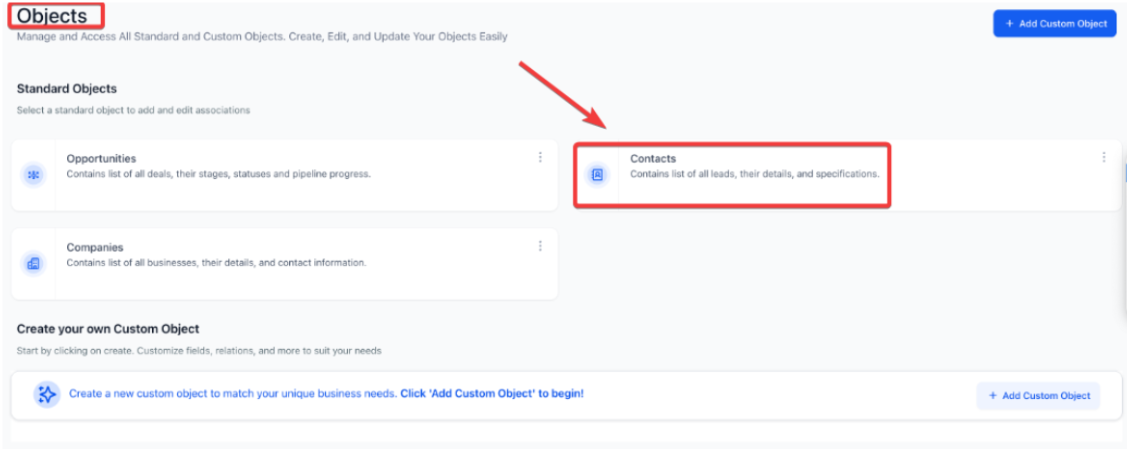
3. Open Contacts: Select the "Contacts" object from the list.
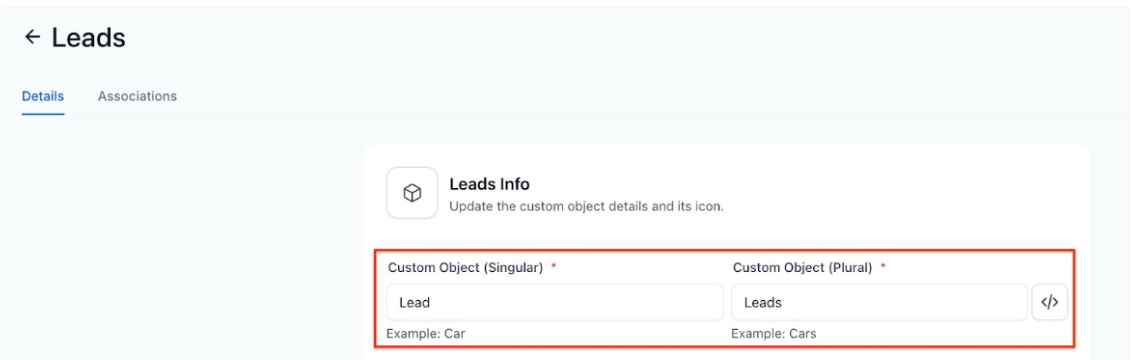
4. Add Custom Names: Enter your custom label in both singular and plural forms (e.g., "Client" and "Clients").
5. Save Changes: Once you've added your custom names, click "Save" to apply the changes.
FAQ
Q1: Can I revert the custom labels back to their default names?
Yes, you can always return to the default "Contacts" label by simply editing the custom names in the settings panel.
Q2: Do the custom labels affect any automated workflows or tags?
No, the custom labels only affect the display name of the objects. They do not impact any existing workflows or automated processes.
Q3: Can I add multiple custom labels for different use cases?
You can only apply one set of custom labels for the "Contacts" object at a time, but you can edit them whenever necessary.
Q4: Is there a character limit for custom labels?
While there is no strict character limit, it's recommended to keep labels concise and easy to understand for better user experience.
Q5: Will this customization be visible to clients?
No, the custom labels are internal and will only be visible to your team when interacting with the system. Clients will still see the standard terms used in client-facing communications.