
How to Add or Remove Logos for Forms (Agency Branding)
How to Add or Remove Logos for Forms (Agency Branding)
You may want to add or remove logo from a form. We will walk you through the simple steps of adding or removing a logo from your forms using the New Form Builder. Follow these simple steps to learn how:
Accessing Form Builder and Editing Form:
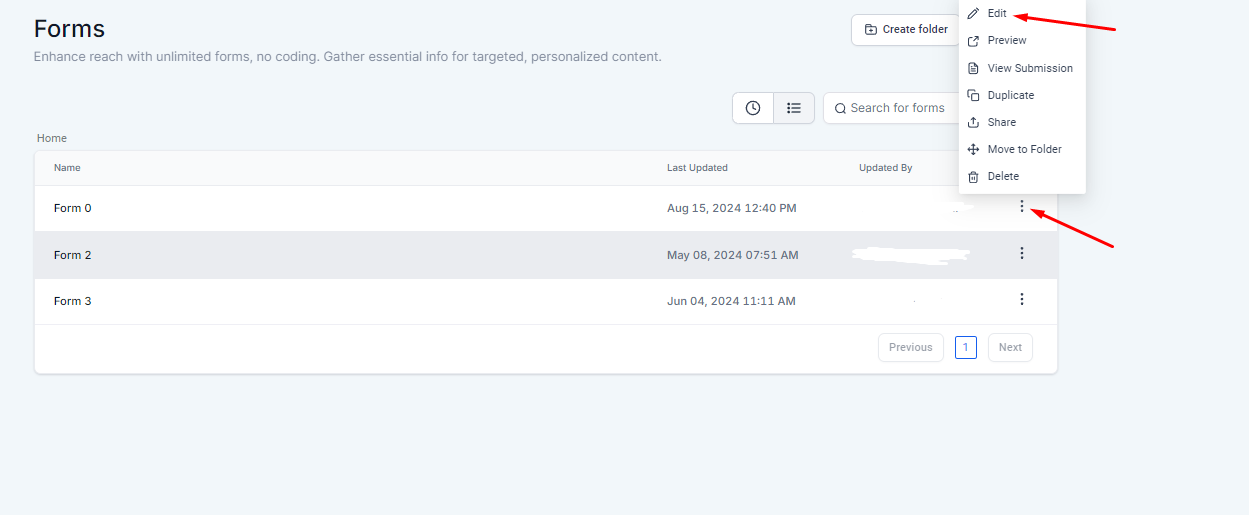
- Navigate to the Form Builder.
- Click "Edit" for the form you wish to update.
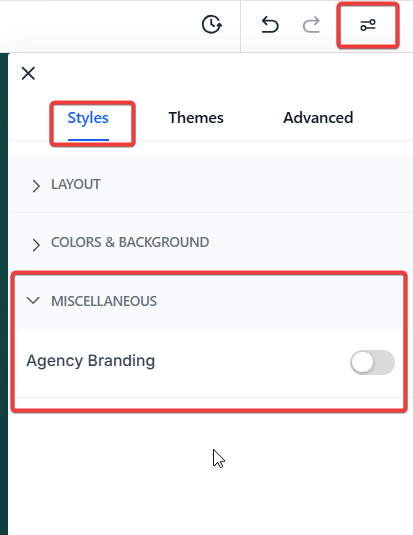
- From the menu on the right-hand side, select Styles.
- Scroll to the bottom, and under Miscellaneous, you can toggle on or off "Agency Branding" to hide or show the 's logo.
Short Notes
- Logo Display Control: The ability to control the display of the logo provides flexibility in branding your forms while maintaining the required professional appearance.
- Quick Changes: The toggle feature allows for quick and easy changes to the form’s branding without needing extensive customization or technical skills.
FAQs
- Can I customize the logo appearance on my form?
- No, the Form Builder allows you to only show or hide the logo. Customization of the logo appearance is not supported.
- Will hiding the logo affect form functionality?
- No, hiding the logo will not affect the functionality of the form. It only changes the visual branding.
- Can I add my own logo instead of the logo?
- Currently, you can only toggle the logo on or off. Adding a custom logo is not supported.
- What if I don't see the "Agency Branding" option?
- 1. Ensure that you are using the New Form Builder. If the option is still not visible, check with your system administrator or support team.
- How do I access the "Agency Branding" option to show or hide the logo?
- To access the "Agency Branding" option, navigate to the Form Builder, click "Edit" for the form you want to update, and then select "Styles" from the right-hand menu. Scroll to the bottom, and under "Miscellaneous," you'll find the toggle to control the display of the logo.