
Workflow Action: Add & Remove Associated Records from Workflows
Modern automation isn’t just about handling one record at a time; it's about managing the relationships between records and acting on them intelligently. With the new Add Associated Records to Workflow and Remove Associated Records from Workflow actions, you can now automate processes across contacts, companies, and custom objects based on how they are connected.
This article outlines how these actions work, what they enable, and how to use them effectively across different types of workflows.
Key Features and Benefits
Cross-Record Automation at Scale
Add Associated Records to Workflow
Enroll related contacts, companies, or custom objects into another workflow based on their association.
Supports various relationship types (e.g., Parent-Child, Assigned Dealer, Employee-Company).
Remove Associated Records from Workflow
Automatically remove associated records from a workflow when they no longer meet specific criteria or when the relationship changes.
Why It Matters
Cross-Object Automation
Easily involve associated records in automations, from notifying teams to updating client communications.
Efficiency
Eliminate the need for manual enrollment or removal. Keep your workflows clean and dynamic.
Control & Accuracy
Ensure that only relevant records stay active in a workflow. Remove contacts or objects as soon as they no longer qualify.
How to Use: Step-by-Step
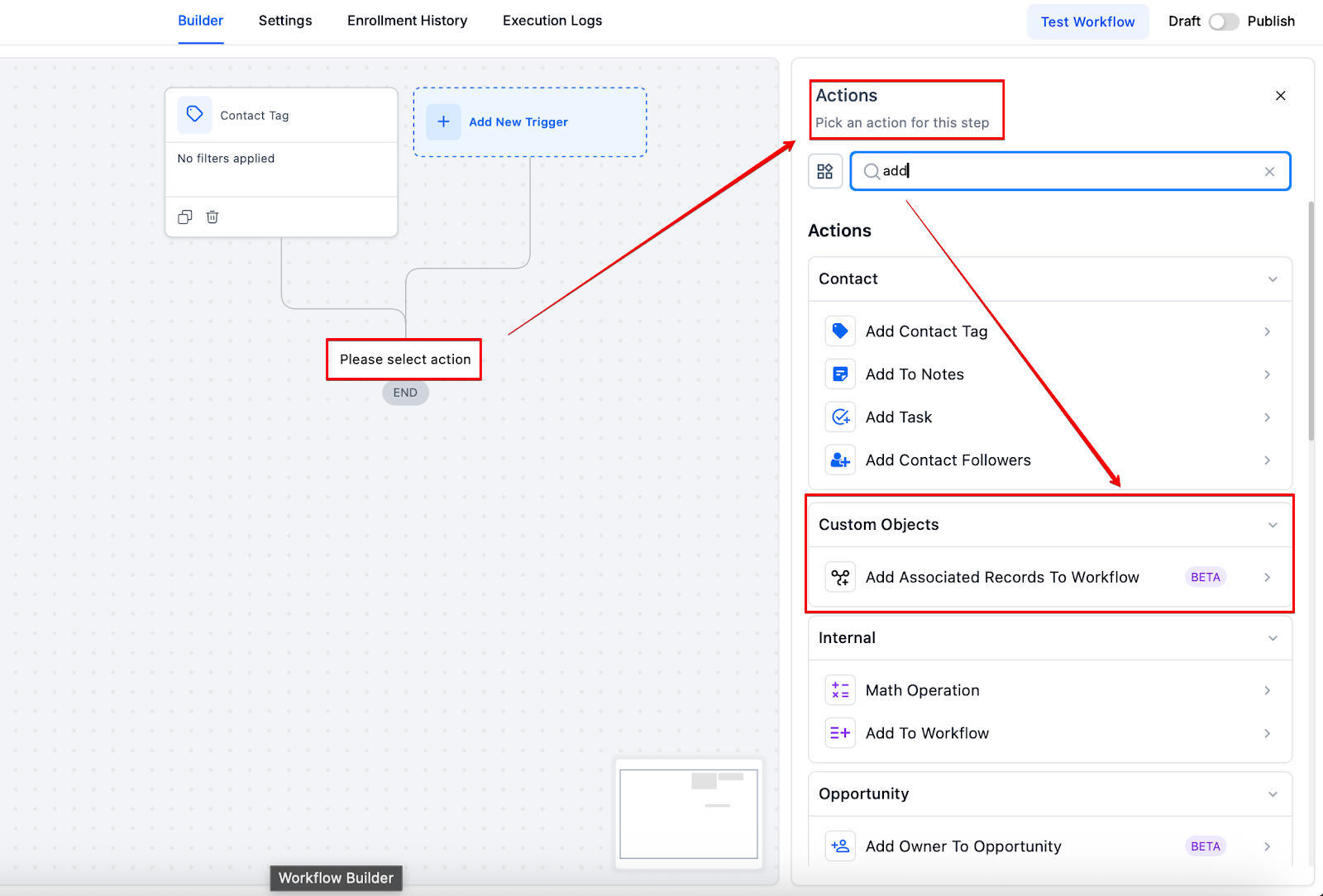
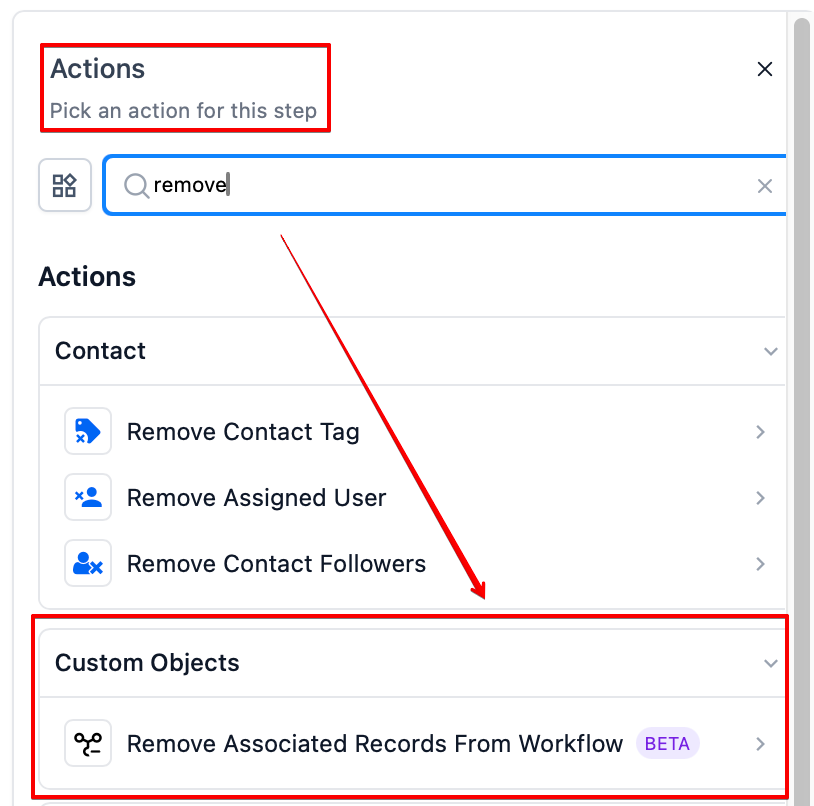
1. Add the Workflow Action
In your workflow editor:
- Choose either Add Associated Records to Workflow or Remove Associated Records from Workflow.
2. Select Object Type
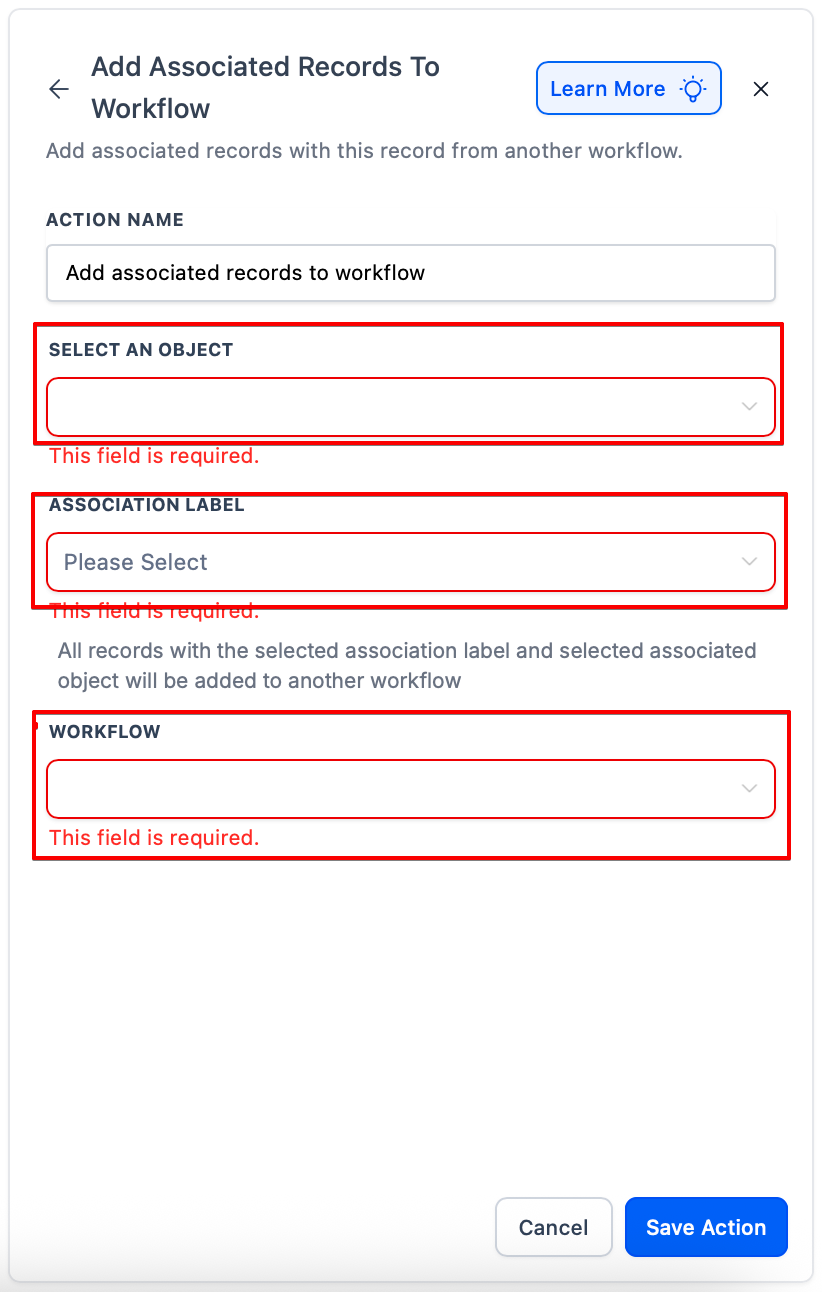
Choose the type of associated record you want to affect:
- Contact
- Company
- Custom Object
3. Choose Association Label
Pick the relevant association label (e.g., Parent-Child, Assigned Dealer, Employee).
These labels define which relationships the action should look for.
4. Select Target Workflow
Choose the workflow where you want to add or remove the associated records.
5. Save and Publish
Once the workflow is published, it will automatically handle the add/remove actions for associated records based on the logic you've defined.
Use Case Examples
Add Associated Records
- Car ↔ Dealer (Custom Object)
- When a Car status becomes “Ready for Sale,” automatically add associated Dealers (label: Assigned Dealer) to a notification workflow.
- Contact ↔ Contact
- When a Student is enrolled, add their Parent contact(s) (label: Parent-Child) to a semester update workflow.
- Company ↔ Contact
- When a Company is marked as VIP, enroll all associated Employees into the VIP communication sequence.
Remove Associated Records
- Car ↔ Dealer (Custom Object)
- When a Car is sold, remove all associated Dealers from the Dealer Alert Workflow to stop updates.
- Contact ↔ Contact
- When a Student graduates, unenroll their Parents from the academic notification workflow.
- Company ↔ Contact
- If a Company status changes to Inactive, remove all linked Employees from active campaign workflows.
(FAQ)
Q1: Can I add multiple associated records at once?
A: Yes. If multiple records share the same association label with the triggering object, they will all be enrolled into the selected workflow.
Q2: What happens if there are no matching associated records?
A: The action will not run. At least one record with the matching association label must exist.
Q3: Is there a delay before associated records are added or removed?
A: No, actions are processed in real time once the workflow conditions are met.
Q4: Can these actions be used in all workflow types?
A: Yes, these actions are available in Contact-based, Company-based, and Custom Object-based workflows.
Q5: What if the same record is already in the target workflow?
A: The system will not duplicate entries. If the record is already enrolled, it won't be added again. Similarly, the remove action will unenroll them only if they are currently active in the workflow.